


Personal trainers need accounting software that handles invoicing, tracks expenses, and simplifies tax preparation.
The right platform automates financial tasks, connects with your bank feeds, and provides mobile access for on-the-go management.
Most fitness professionals waste hours on manual bookkeeping when cloud-based accounting software could handle these tasks automatically.
The US personal training industry is valued at $11.9 billion in 2025, according to IBISWorld, with over 329,000 businesses operating across the country. Behind every successful US-based trainer is a business that needs to invoice clients, track deductible expenses, and file quarterly estimated taxes accurately.
The right accounting software makes all of that manageable, without hiring a full-time bookkeeper.
Your personal training business generates income from multiple streams. Client sessions, subscription packages, and online programs all require proper financial tracking. Understanding the full cost of running your business helps you choose the right tools from the start.
Choosing accounting software isn’t about finding the most features. It’s about selecting the platform that matches your business size, technical comfort level, and growth plans.
This guide examines the top accounting software options for personal trainers. We’ll explore key features, pricing structures, and integration capabilities to help you make an informed decision.
Managing finances manually creates significant challenges for personal training businesses. Spreadsheets become cluttered, receipts get lost, and tax time turns into a nightmare.
Accounting software centralizes your financial management. Every transaction, invoice, and expense lives in one secure, cloud-based system.
The fitness industry presents unique accounting challenges. You might train clients at multiple locations, sell merchandise alongside services, or manage recurring billing for membership packages. Standard bookkeeping methods struggle with this complexity.
Professional accounting platforms handle these scenarios effortlessly. They track mileage between client locations, categorize different revenue streams, and automate recurring invoices for subscription-based training programs.
Financial reporting transforms how you understand your business. Clear profit-and-loss statements show which services generate the most revenue. Cash flow reports reveal when you need to adjust pricing or marketing efforts.
Real-time financial data enables better business decisions. You can identify your most profitable clients, determine which locations generate the best returns, and spot seasonal trends in your income.
The right accounting software combines essential financial management tools with the flexibility of the fitness industry. These features determine whether a platform truly serves your personal training business.
Your accounting software should create professional invoices in minutes. Look for platforms that customize invoice templates with your branding, training packages, and session rates.
Payment processing integration matters enormously. Clients should pay directly via credit card, debit card, or bank transfer. The best systems automatically record these payments in your accounting records.
Choosing the right online payment processor for your fitness business is a related decision worth getting right.
Recurring billing becomes critical for subscription-based training programs. Set up automatic invoices for monthly packages, and your accounting software handles the rest. This automation reduces administrative work while ensuring consistent cash flow.
Personal trainers accumulate numerous business expenses. Equipment purchases, gym memberships, certification courses, and travel costs all require proper documentation.
Mobile apps with receipt capture functionality change how you track expenses. Photograph receipts immediately after purchase, and the software automatically extracts relevant data. No more shoeboxes full of crumpled receipts.

Mileage tracking deserves special attention. Many personal trainers travel between client locations, generating significant tax deductions.
Quality accounting software includes automatic mileage logging that calculates deductible amounts based on current IRS rates.
Bank feed integration replaces manual data entry with automated transaction imports. Connect your business bank accounts, and transactions flow directly into your accounting software.
Automatic reconciliation matches bank transactions with recorded income and expenses. This feature eliminates hours of manual checking while catching errors and discrepancies immediately.
Real-time updates keep your financial data current. You always know your exact cash position, outstanding invoices, and upcoming expenses.
Tax time creates stress for many personal trainers. Proper accounting software categorizes transactions throughout the year, making tax preparation straightforward.
Look for platforms that generate tax-ready reports. Profit and loss statements, expense summaries by category, and income breakdowns should export directly to your accountant or tax software.
As a self-employed trainer, you’re responsible for quarterly estimated tax payments to the IRS. The right accounting software tracks your net income throughout the year, so you can calculate what you owe each quarter and avoid penalties at filing time.
Financial reports reveal patterns in your personal training business. Standard reports include profit and loss statements, balance sheets, and cash flow summaries.
Customizable dashboards provide at-a-glance insights. Track key metrics like monthly revenue, expense ratios, and client retention rates without generating full reports.
Analytics help you make data-driven decisions. Identify which training packages generate the highest profit margins, determine optimal pricing strategies, and spot opportunities for business growth.
Personal trainers work on the go. Quality accounting software includes robust mobile apps for iOS and Android devices.
Create and send invoices from your phone between training sessions. Capture receipts immediately after purchases. Check your bank balance before making business decisions.
Mobile app functionality shouldn’t compromise features. The best platforms offer nearly identical capabilities on mobile devices and desktop computers.
Your accounting software should connect with other business tools. Integration with payment processors, scheduling systems, and client management platforms creates seamless workflows.
You can use dedicated personal training business tools alongside your accounting platform.
Many personal trainers use specialized fitness software for program design and client communication.
PT Distinction integrates with your wider business stack, so your client management, programming, and communication stay in one place while your accounting software handles the numbers.
Third-party app marketplaces expand functionality. Connect your accounting software with email marketing platforms, payroll services, or inventory management systems as your business grows.
These accounting platforms excel at serving small business needs. Each option provides essential financial management tools while catering to different business sizes, budgets, and technical requirements.
We’ve evaluated these platforms based on invoicing capabilities, expense tracking features, tax preparation tools, and mobile app functionality.
The following recommendations match specific personal trainer needs and business situations.
QuickBooks Online dominates the small business accounting software market for good reason. The platform combines comprehensive features with user-friendly design.

This software handles every accounting task personal trainers face. Create professional invoices with custom branding, track expenses with automatic categorization, and generate detailed financial reports instantly.
QuickBooks Online excels at bank feed integration. Connect your business bank accounts and credit cards to automatically import transactions.
The platform learns your categorization patterns, reducing manual data entry over time.
Mobile app functionality matches desktop capabilities. Send invoices from your phone, capture receipt photos, and check your financial dashboard between training sessions. The app syncs seamlessly across all devices.
Payment processing integration simplifies client billing. Clients pay invoices directly by credit card, debit card, or bank transfer. Fees apply, but the convenience often justifies the cost.
Recurring billing automation suits subscription-based training programs perfectly. Set up automatic invoices for monthly packages, and QuickBooks handles everything from generation to payment reminders.
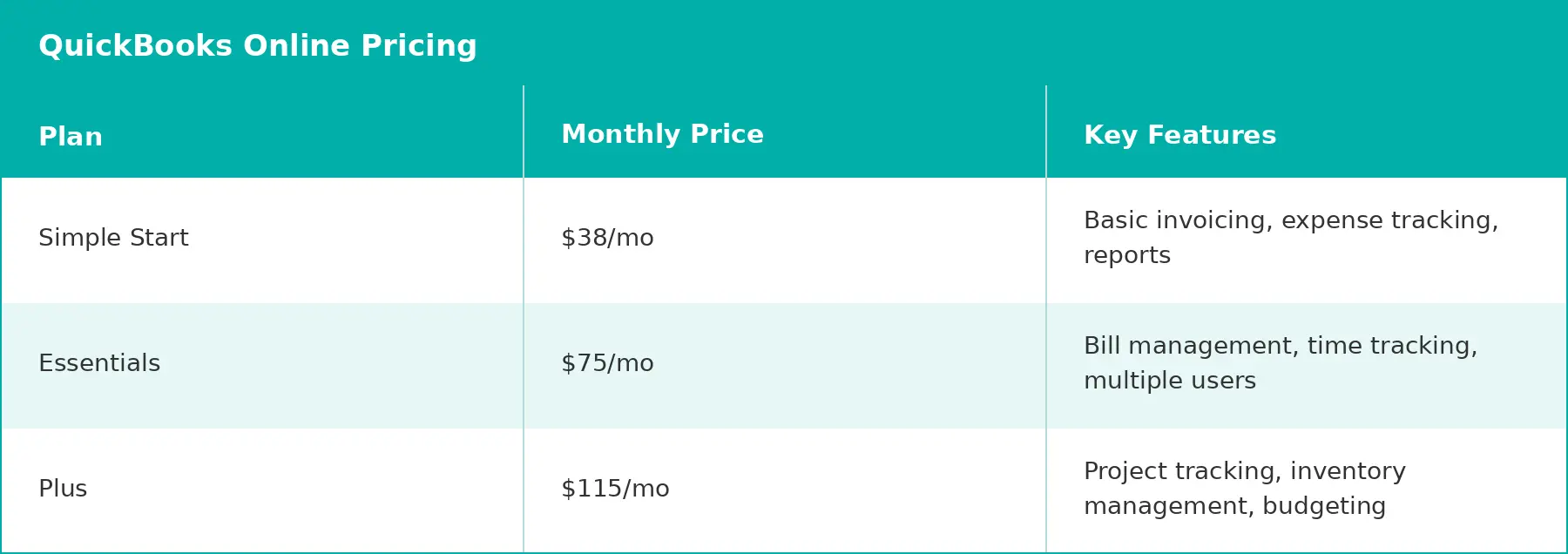
Pros: QuickBooks Online offers the most comprehensive feature set for personal training businesses. The platform scales from solo trainers to growing fitness companies. Integration options connect with hundreds of third-party apps.
Cons: Pricing increases significantly for advanced features. Some users find the interface overwhelming initially. Customer support quality varies based on subscription tier.
Best for: Personal trainers seeking industry-standard accounting software that scales with their business. Ideal if you plan to hire staff, manage multiple locations, or expand service offerings.
Xero provides powerful accounting features wrapped in an intuitive interface. The platform excels at supporting businesses through growth phases.
This software handles complex financial management without overwhelming users.
Bank reconciliation happens automatically, expense tracking captures every receipt, and financial reporting provides actionable insights, including the ability to collaborate with your accountant directly inside the platform in real time.
Inventory management features help trainers who sell supplements, merchandise, or equipment alongside services. Track stock levels, set reorder points, and efficiently manage multiple product lines.
The mobile app delivers full accounting functionality on smartphones and tablets.
Create quotes, convert them to invoices, and reconcile bank transactions from anywhere. The interface remains clean despite its extensive feature set.
A broad app store extends Xero's capabilities. Connect payment processors, scheduling tools, and client management platforms for seamless workflows.
Pros: Xero covers the full range of accounting tasks that personal trainers need, including invoicing, bank reconciliation, expense tracking, reporting, and inventory management, all in one clean interface.
The ability to collaborate directly with your accountant within the platform in real time is a genuine differentiator. The mobile app keeps everything accessible between sessions.
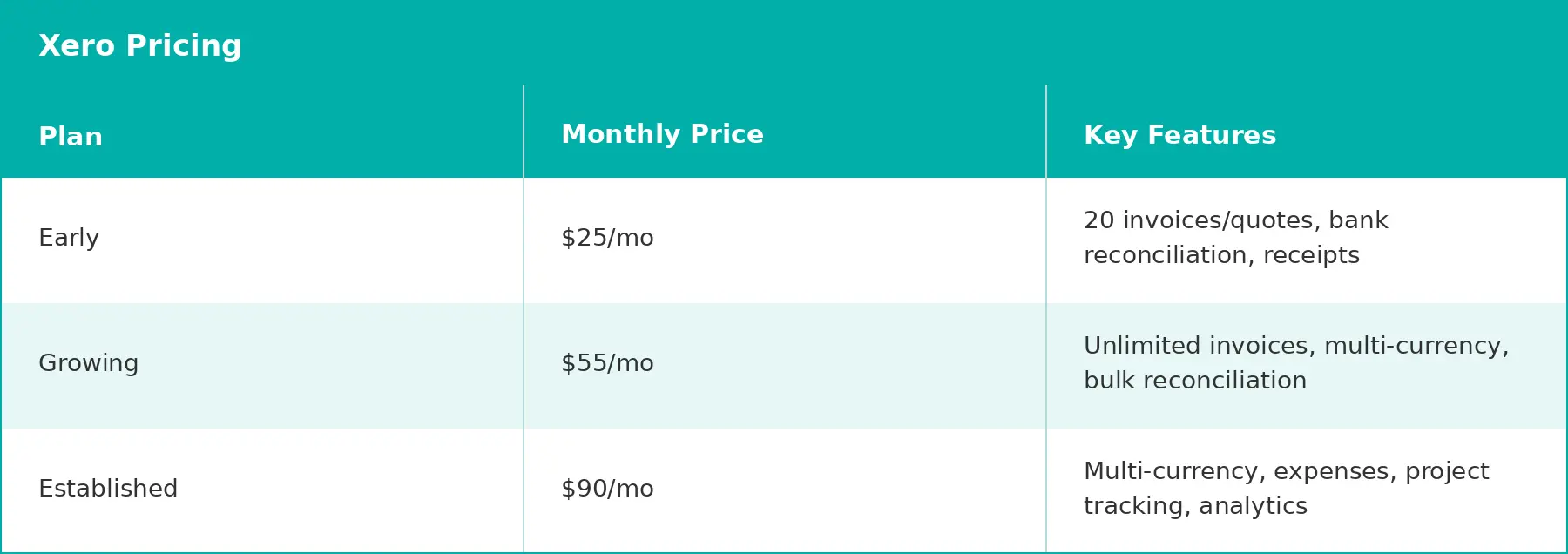
Cons: The Early plan limits you to 20 invoices and 5 bills per month, which won't suit busier trainers. Features like project tracking, multi-currency, and expense claims are only available in the Established plan, so the mid-tier Growing plan has a noticeable gap.
Some functionality also relies on third-party app connections.
Best for: Personal trainers who work closely with an accountant and want a platform that supports that collaboration.
Also a strong fit if you sell merchandise or supplements alongside your services and need inventory tracking built in.
FreshBooks focuses specifically on service-based businesses like personal training. The platform streamlines invoicing and time tracking for professionals who bill by session or project.
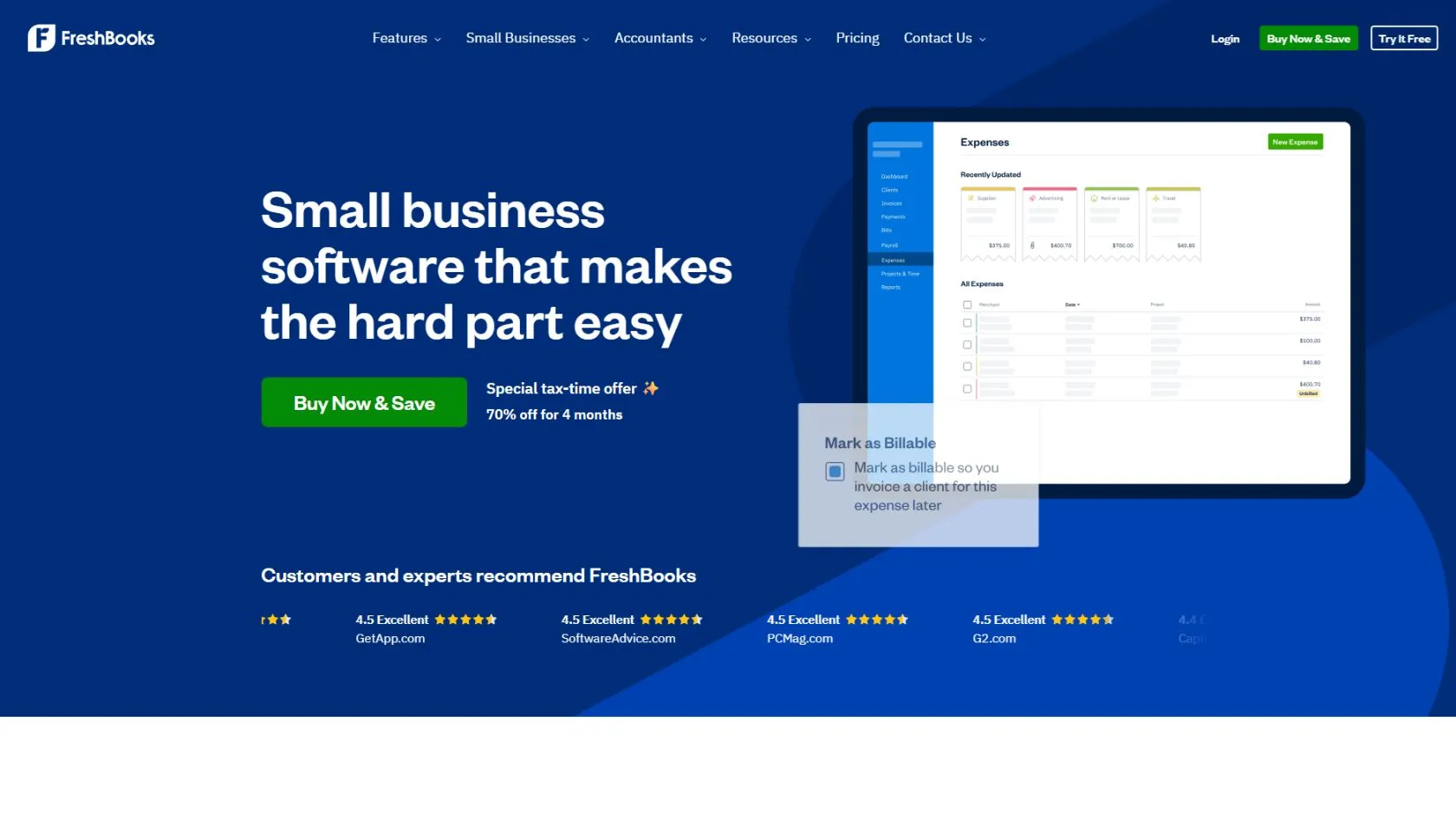
Creating invoices takes seconds in FreshBooks. The software includes templates designed for service providers, with clear session descriptions and professional formatting.
Clients receive invoices via email and can pay immediately through integrated payment processing.
Time tracking features help trainers who bill hourly or want detailed records of client interactions. Start timers when sessions begin, stop when they end, and convert tracked time directly to invoices.
Expense management includes receipt capture through mobile apps on Plus plans and above.
Photograph receipts, and FreshBooks extracts relevant data automatically. The Lite plan covers manual expense tracking.
Project organisation helps trainers manage multiple clients with different training programs.
Group related invoices, expenses, and time entries by client or project for financial oversight. Full project profitability reporting is available on the Premium plan.
FreshBooks excels at client communication. Send automated payment reminders, thank-you messages, and invoice notifications.
The system tracks who opened invoices and when, helping you follow up strategically.
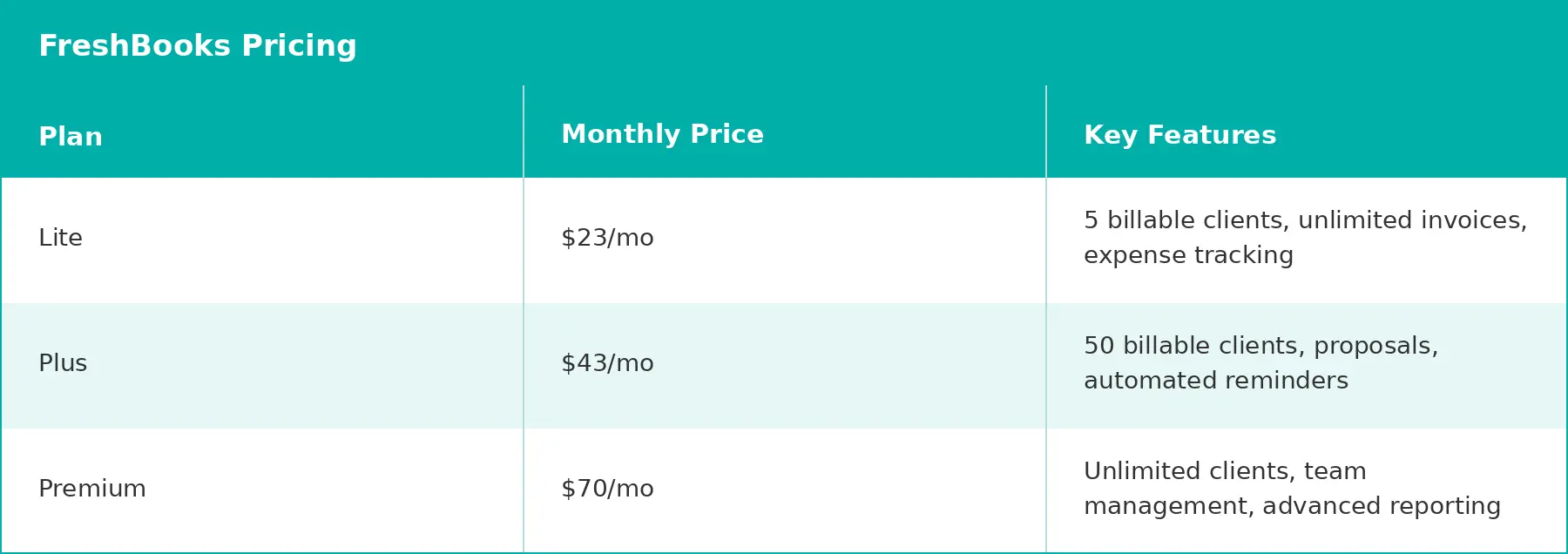
Pros: FreshBooks offers the most intuitive invoicing experience for service-based businesses. Time tracking integration suits trainers who bill hourly. The platform requires minimal accounting knowledge to use effectively.
Cons: Limited features beyond invoicing and expense tracking compared to comprehensive accounting platforms. Client limits on lower-tier plans restrict growing businesses, with just 5 billable clients on Lite. Double-entry accounting reports and bank reconciliation require the Plus plan or above.
Best for: Personal trainers who prioritize simple, effective invoicing over comprehensive accounting features. Ideal for solo trainers or small businesses focused on client billing and basic expense tracking.
Wave provides free core accounting software for small businesses. The platform generates revenue through optional payment processing and payroll services rather than subscription fees.
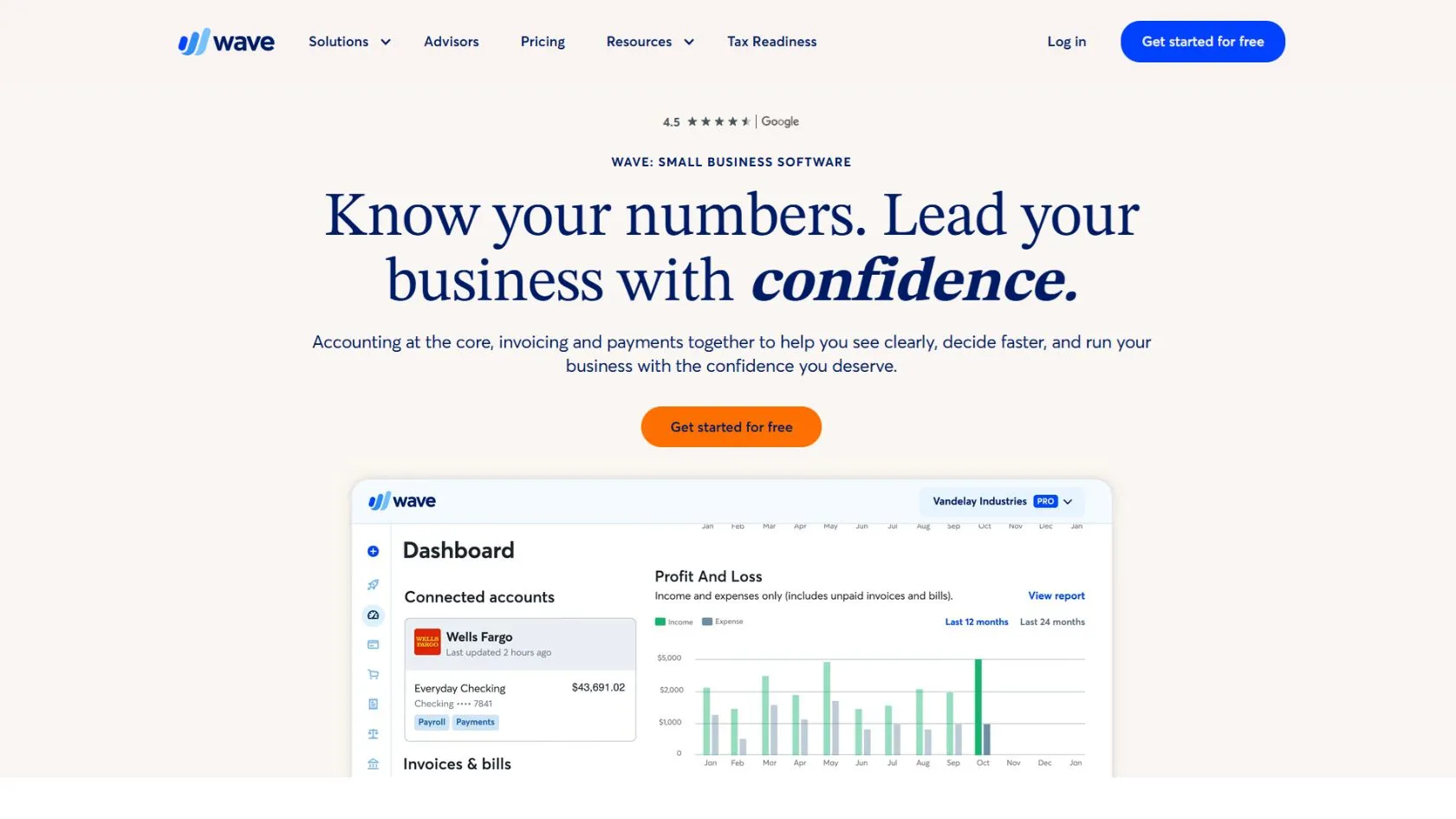
The free Starter plan covers the basics: unlimited invoices, estimates, and bookkeeping records, plus a cash flow dashboard. Receipt capture, auto bank import, and invoice branding require either the Pro plan or paid add-ons.
Invoicing on the Starter plan is functional but stripped back. You can create and send unlimited invoices manually, set up recurring invoices, and accept payments through the optional payment processing add-on.
The Pro plan unlocks invoice branding, mobile invoicing, and automated late payment reminders.
Expense tracking on the Starter plan is manual. The Pro plan adds automatic bank transaction import, auto-categorization, and digital receipt capture, which together cover most of what a personal trainer needs for day-to-day bookkeeping.
Financial reporting covers the essentials on both plans: profit and loss statements, sales tax summaries, and income breakdowns. The Pro plan gives fuller dashboard access.
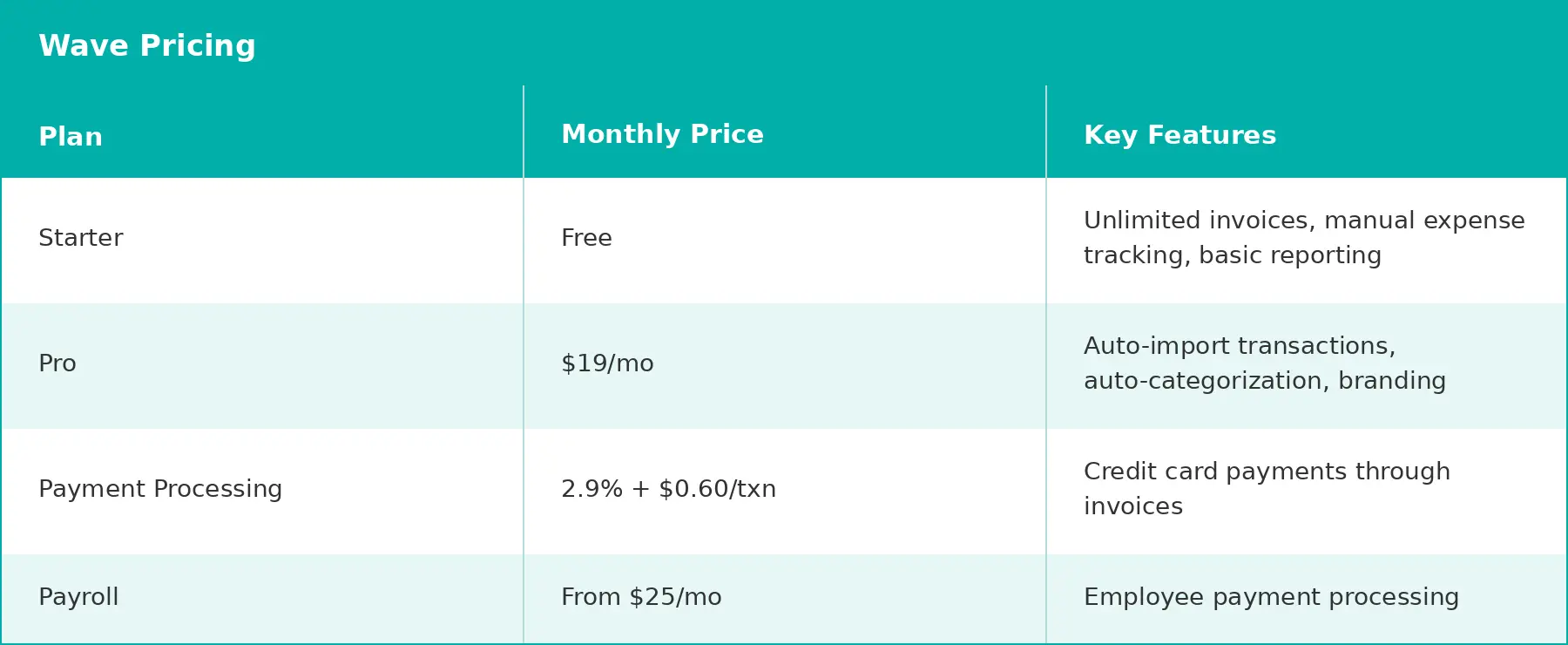
Pros: Wave's Starter plan removes the monthly subscription fee entirely, making it genuinely useful for trainers just starting out or for those keeping finances simple.
The Pro plan at $19/mo adds meaningful automation at a price that undercuts most competitors.
Cons: The free Starter plan is quite limited in practice. Receipt capture, invoice branding, auto bank import, and live support all sit behind the Pro plan or paid add-ons. Payment processing fees apply in addition to either plan.
Best for: Solo personal trainers who want to test cloud-based accounting without committing to a monthly fee, or those with straightforward finances who don't need automation.
Trainers who want more functionality will likely find the Pro plan at $19/mo the realistic starting point.
Zoho Books is part of the extensive Zoho ecosystem of business applications. This connection creates powerful integration opportunities for personal trainers using multiple business tools.
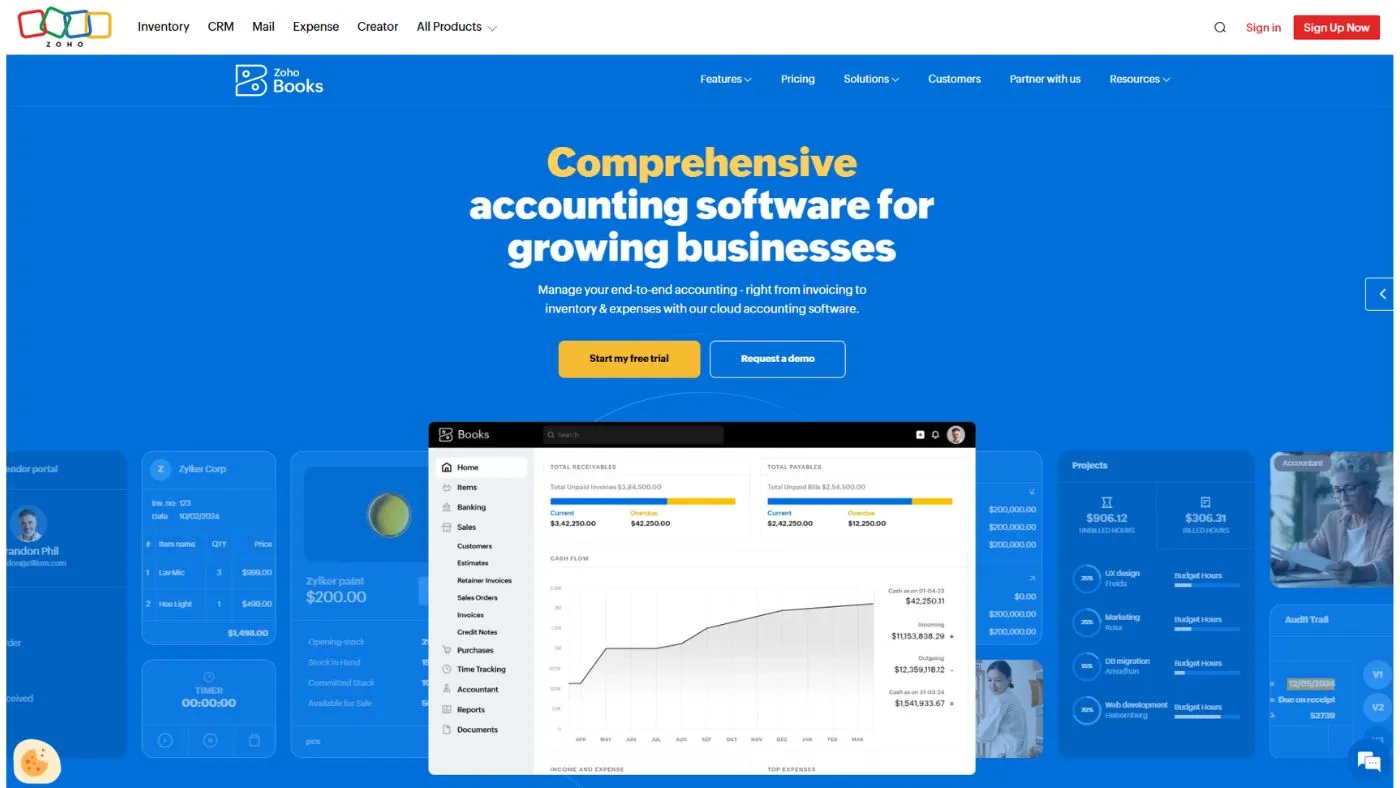
The accounting platform includes comprehensive features comparable to QuickBooks or Xero. Bank reconciliation, expense tracking, invoicing, and financial reporting all function smoothly within an intuitive interface.
Zoho’s strength lies in seamless integration with other Zoho applications. Connect Zoho CRM for client management, Zoho Projects for program tracking, or Zoho Inventory for supplement sales. Data flows automatically between platforms.
Automation features are built as you move up the plans. The Standard plan adds bank feeds, recurring expenses, and custom reports.
The Professional plan unlocks full workflow customization, allowing you to set up rules that automatically categorize expenses, send invoice reminders, or generate recurring bills.
Multi-currency support is available on the Professional plan and above, which benefits trainers with international clients.
Invoice in different currencies, track exchange rates automatically, and generate reports that consolidate multi-currency transactions.
The mobile app provides full accounting functionality on smartphones and tablets. Create invoices, scan receipts, check financial dashboards, and reconcile transactions while traveling between client locations.
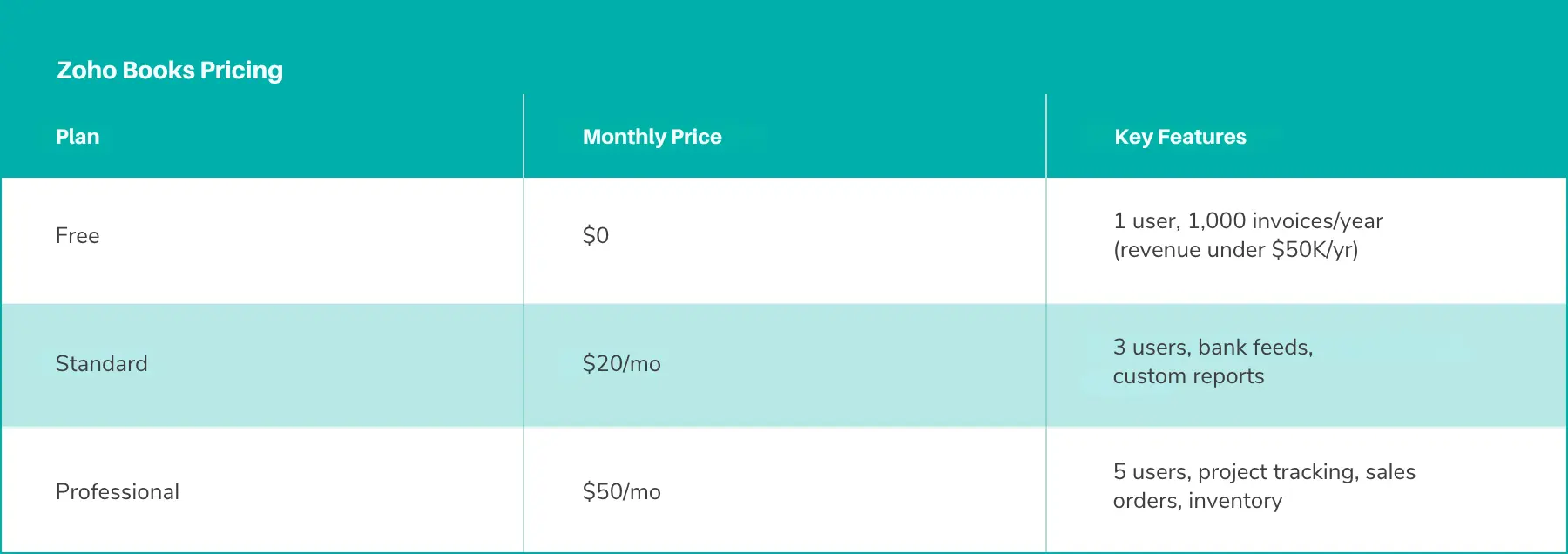
Pros: Zoho Books offers strong value with a comprehensive feature set at competitive prices. Integration with the Zoho ecosystem creates powerful workflows for trainers already using other Zoho tools. The free plan is genuinely functional for very small operations.
Cons: The interface feels less polished than premium competitors. A learning curve exists for maximizing integration benefits. Customer support quality varies by subscription tier and region.
Best for: Personal trainers using multiple business tools who want seamless data flow. Ideal if you already use Zoho applications or plan to build an integrated business management system.
Selecting accounting software requires honest assessment of your business needs, technical comfort, and growth plans. The right platform today should serve your business for years ahead.
Solo trainers have different needs than team-based operations. If you work independently with straightforward finances, simpler platforms like Wave or FreshBooks often suffice.
Growing businesses benefit from scalable solutions. QuickBooks Online and Xero accommodate expansion without requiring platform changes. You’ll avoid migration headaches when hiring staff or adding services.
Accounting software varies significantly in complexity. FreshBooks prioritizes simplicity, making it accessible for trainers without bookkeeping experience.
QuickBooks offers more features but requires a steeper learning investment.
Your accountant’s preferences matter too. Most accounting professionals work comfortably with QuickBooks or Xero.
Choosing their preferred platform streamlines collaboration and year-end tax preparation.
List the business tools you currently use. Scheduling software, client management systems, and payment processors should integrate with your accounting platform.
Check integration availability before committing. Most platforms publish lists of compatible applications. Strong integration saves hours of duplicate data entry while reducing errors.
Subscription fees represent just one cost component. Payment processing fees, payroll services, and additional user charges add up quickly.
Compare total costs across platforms for your specific usage patterns.
A platform with higher base fees might cost less overall if payment processing rates are competitive. This is part of the broader picture when you’re pricing your coaching services and building a sustainable business.
Most accounting platforms offer free trials ranging from 14 to 30 days. Use this period to test real workflows, not just explore features.
Create actual invoices for clients. Import your bank transactions. Generate financial reports you’ll reference regularly.
This hands-on experience reveals whether the platform truly fits your business.
Your personal training business will evolve. Consider whether potential platforms can accommodate future needs such as team management, multiple locations, or diverse revenue streams.
Switching accounting software disrupts operations significantly. Choose a platform that grows with your business rather than selecting based solely on current requirements.
Properly implementing accounting software lays the foundation for accurate financial management. These initial steps ensure smooth transitions and reliable data.
For a broader look at organizing your business operations, see our guide to streamlining your personal training business systems.
Most platforms include default account structures. Customize these categories to match your personal training business specifically.
Create income categories for different revenue streams. Separate individual training sessions, group classes, and online programs for detailed profitability analysis.
Organize expense categories logically. Equipment purchases, professional development, marketing costs, and travel expenses each deserve distinct categories for tax purposes.
Link all business bank accounts and credit cards immediately. This connection enables automatic transaction imports and real-time financial updates.
Review security measures carefully. Quality accounting platforms use bank-level encryption and read-only access to protect your financial data.
Consider importing the recent financial history if switching from another system. Most platforms facilitate data imports through CSV files or direct connections.
Start fresh if historical data proves messy or incomplete. Begin with your current bank balance and record transactions from the implementation date forward.
Design professional invoice templates that reflect your brand. Include your logo, business colors, and contact information prominently.
Set up service items for common offerings. Pre-configured items for individual sessions, package deals, and online programs significantly speed up invoice creation.
Schedule weekly time for financial management tasks. Reconcile bank transactions, review outstanding invoices, and categorize expenses while they’re fresh in your memory.
Monthly financial reviews provide strategic insights. Generate profit and loss reports, analyze revenue trends, and adjust business strategies based on actual performance data.
Proper accounting software transforms financial management from an overwhelming burden to a strategic asset. The platforms discussed here serve personal trainers at every business stage, from solo operations to growing fitness companies.
Your choice depends on specific needs, technical comfort, and growth ambitions. Test options through free trials, consult with your accountant, and select the platform that simplifies your financial life while supporting your business goals.
For deeper guidance on managing your numbers, explore our resources on tracking your fitness business finances and money management for personal trainers.
The more clearly you understand your finances, the better positioned you are to make decisions that grow your business and serve your clients at a higher level.
PT Distinction is built to help personal trainers run a more organized, scalable business.
While your accounting software manages the numbers, PTD handles client management, program delivery, and automated check-ins so you can focus on coaching.
Start your free 1-Month trial today and see how the right tools work together to simplify your business.
Ready to join the family?
We'll get you up and running in no time. Start with our zero-risk free trial and build your personal training empire today.